Of course I love YouTube
I've posted so many YouTube videos on this blog already
But just to humor you all, I will post another (and maybe this time it will be more educational!).
The thing I really love YouTube for is the educational/DIY type of videos. Obviously some of them are really good and some are horrible but I am almost always able to find what I have been looking for.
Example -
Just a few weeks ago my friend Mandy and I decided we wanted to make crab rangoons for Jon and Sean but we had no idea what we were doing.
So we looked on YouTube and found this video:
It worked like charm. Gai (or Kai in some of his videos) not only gave us a recepie but step by step instructions for making the crab rangoons.
They turned out great!
Podcasts -
Now, I've been subscribing to podcasts on and off for a while. Well pretty much since I got my first iPod about 5 years ago.
Right now I've been listening to Car Talk (from NPR) and the KnitPicks podcast (its knitting!)
And I love them both. They're great for long distances and don't get as messy on my iPod as audio books (which never have all of the tracks right!)
I think podcast would be great for recording special events at the library and sharing them with the public (video podcasts would be even better!) or as a kind of tutorial.
Downloadable Media -
I WOULD LOVE TO BE ABLE TO USE OVERDRIVE WITH MY MAC AND IPOD!
This is my number one greatest wish.
Santa, Please bring me Overdrive that works for Christmas. I promise I'll be good for the rest of the year.
Thank you,
.micki.
I know its all the fault of Apple/Microsoft/the music and audiobook companies but I feel like we are not reaching a lot of our patrons because its not compatable.
I know there are cheap audio players out there. The $40-ish one offered as a prize for this program for example. But I really don't want something else. I want audiobooks on my iPod that I A) don't have to buy them from iTunes or someone else or B) I don't have to physically upload each CD. I don't mind the short lending period, I don't mind downloading new software, I just want it to work with my iPod.
So Santa, please fulfill my request.
And don't even get me started on MyLibraryDV.
Showing posts with label owhatageek. Show all posts
Showing posts with label owhatageek. Show all posts
Thursday, October 30, 2008

Tuesday, October 21, 2008
Week #8 - Web-based Apps, Library 2.0
Google Docs -
Especially helpful for downloading documents on your Google email and saving them for later (this really helps when I just can't find that email I was looking for). I have a few things on Google docs. Here's one I've been using. It's a list of the days and day #'s for my 365 project. It really helps me keep track of the day that I'm on (I really don't want to mess anything up!)
The one problem I've seen so far with Google Docs is that they just aren't as robust as the Microsoft (or even OpenOffice) version.
Example - in the spreadsheet above, it would not let me go over 100 rows. So, I couldn't get the whole project on one sheet!
Kind of dissapointing...I think it Google Docs were more robust in this way I would be much more inclined to use them all of the time.
I've made a full version of the list on a Microsoft spreadsheet but it would be nice to be able to have it anywhere.
I really think that Google docs would be great if you happened to not have a flash drive with you somewhere. But I really haven't had a chance to use it like that yet.
More Web 2.0 -
One of the sites that I was very excited to see inthe Web 2.0 Awards was Pandora. I love this site! Not only does it have all the kinds of music I love (mostly indie-pop/rock) but it will also recomend to me other artists similar to the ones I already like and gives me a chance to sample some of their work.
Now the bad thing about Pandora is that it really is a Radio station. You cannot decide what plays next, you can only skip a few songs every hour, and I find these things very limiting. I like Pandora when I am working or working on homework and I am not really paying too much attention to what I am listening to. It's great for background noise but it doesn't replace my iTunes.
Especially helpful for downloading documents on your Google email and saving them for later (this really helps when I just can't find that email I was looking for). I have a few things on Google docs. Here's one I've been using. It's a list of the days and day #'s for my 365 project. It really helps me keep track of the day that I'm on (I really don't want to mess anything up!)
The one problem I've seen so far with Google Docs is that they just aren't as robust as the Microsoft (or even OpenOffice) version.
Example - in the spreadsheet above, it would not let me go over 100 rows. So, I couldn't get the whole project on one sheet!
Kind of dissapointing...I think it Google Docs were more robust in this way I would be much more inclined to use them all of the time.
I've made a full version of the list on a Microsoft spreadsheet but it would be nice to be able to have it anywhere.
I really think that Google docs would be great if you happened to not have a flash drive with you somewhere. But I really haven't had a chance to use it like that yet.
More Web 2.0 -
One of the sites that I was very excited to see inthe Web 2.0 Awards was Pandora. I love this site! Not only does it have all the kinds of music I love (mostly indie-pop/rock) but it will also recomend to me other artists similar to the ones I already like and gives me a chance to sample some of their work.
Now the bad thing about Pandora is that it really is a Radio station. You cannot decide what plays next, you can only skip a few songs every hour, and I find these things very limiting. I like Pandora when I am working or working on homework and I am not really paying too much attention to what I am listening to. It's great for background noise but it doesn't replace my iTunes.
Tuesday, October 14, 2008
Week #7 - Wiki
Wikis
I love wikis.
In fact I've set up a wiki here...to help us set up a wiki to replace Samepage (MAYBE!!! Don't get all excited yet!)
Wikis are great because they are so collaborative. Anyone can change them (or just the people you want to), they're adaptable, and offer the ability to intigrage other 2.0 technologies.
Let me know what you think about a wiki for Samepage.
Post something to our new wiki, send me an email, or call me.
I'm really excited about all of the possibilities this will open up for us.
I love wikis.
In fact I've set up a wiki here...to help us set up a wiki to replace Samepage (MAYBE!!! Don't get all excited yet!)
Wikis are great because they are so collaborative. Anyone can change them (or just the people you want to), they're adaptable, and offer the ability to intigrage other 2.0 technologies.
Let me know what you think about a wiki for Samepage.
Post something to our new wiki, send me an email, or call me.
I'm really excited about all of the possibilities this will open up for us.
Looking at other library wikis has really helped me think about what we would need to implement a wiki in our library.
Tuesday, October 7, 2008
Week #6 - Delicious - Technorati - 2.0 Discussions
I'm not going to lie....delicious is pretty cool.
I can bookmark all of those interesting/weird/wild/crazy websites or articles that only I would enjoy. And maybe some other people in this big world.
So I've started one.
It just seems to be another one of those 2.0 tools that I think are a great idea and I really want to use. But in the long run, will it actually work for me?
I can see that it would be really good for people who are collecting articles for a project or for research. You know...like high school debate kids. Or people who just like to collect weird things.
I don't think it replaced my bookmark list on my browser though. I usually use that to remember shopping sites that I like or the web pages that I use for school.
And my feed reader has taken over the job of keeping track of the blogs I follow.
I guess I'm just not sure how much I will use delicious...but I can see how it will prove to be helpful with somethings.
Well, thanks to Technorati I have added a few more blogs to Google Reader...so what does that put me at now..hmmm way to many it seems.
I was able to find things that I liked pretty easily but the site itself was a little funny. There were a few different ways to search for blogs. CONFUSING!
I think it would be helpful if I was really really into reading lots of blogs or see what is new in the blogosphere...but I'm not really.
Library 2.0 Discussions -
In my opinion libraries in the next ten years will be expected to do a lot more with a lot less money. And one of the ways that we will be able to reach more people and do more for them is through the web.
Libraries are expected to not only keep up with the current technology but to be a head of the curve. We need to start now if we want to continue to reach people (especially youth). There are a lot of libraries out there doing a good job but there are many more who aren't doing anything with web 2.0.
I think its imporant to all of us to make an effort. It keeps us relevant
1. Take a look at Technorati and try doing various keyword searches in the different search areas. Do you get different results depending on where you search?
2. Explore popular blog, searches and tags. Is anything interesting or surprising in your results?
3. Create a blog post about your discoveries on this site.
OPTIONAL: If you're up for a challenge, learn how to tag your posts by with Technorati tags so they can join tag searches. Create a post about something. It can be anything you want and add the HTML code to the bottom to tag it as “PLCMCL2.” You may also want to consider claiming your blog and creating a watchlist.
NOTE: When adding HTML code, you'll want to make sure you're in Blogger's Edit HTML window.
1. Read some of the perspectives on Library 2.0 from the list above.
2. Create a blog post about your thoughts on Library 2.0 - It's many things to many people. What does it mean to you?
I can bookmark all of those interesting/weird/wild/crazy websites or articles that only I would enjoy. And maybe some other people in this big world.
So I've started one.
It just seems to be another one of those 2.0 tools that I think are a great idea and I really want to use. But in the long run, will it actually work for me?
I can see that it would be really good for people who are collecting articles for a project or for research. You know...like high school debate kids. Or people who just like to collect weird things.
I don't think it replaced my bookmark list on my browser though. I usually use that to remember shopping sites that I like or the web pages that I use for school.
And my feed reader has taken over the job of keeping track of the blogs I follow.
I guess I'm just not sure how much I will use delicious...but I can see how it will prove to be helpful with somethings.
Well, thanks to Technorati I have added a few more blogs to Google Reader...so what does that put me at now..hmmm way to many it seems.
I was able to find things that I liked pretty easily but the site itself was a little funny. There were a few different ways to search for blogs. CONFUSING!
I think it would be helpful if I was really really into reading lots of blogs or see what is new in the blogosphere...but I'm not really.
Library 2.0 Discussions -
In my opinion libraries in the next ten years will be expected to do a lot more with a lot less money. And one of the ways that we will be able to reach more people and do more for them is through the web.
Libraries are expected to not only keep up with the current technology but to be a head of the curve. We need to start now if we want to continue to reach people (especially youth). There are a lot of libraries out there doing a good job but there are many more who aren't doing anything with web 2.0.
I think its imporant to all of us to make an effort. It keeps us relevant
1. Take a look at Technorati and try doing various keyword searches in the different search areas. Do you get different results depending on where you search?
2. Explore popular blog, searches and tags. Is anything interesting or surprising in your results?
3. Create a blog post about your discoveries on this site.
OPTIONAL: If you're up for a challenge, learn how to tag your posts by with Technorati tags so they can join tag searches. Create a post about something. It can be anything you want and add the HTML code to the bottom to tag it as “PLCMCL2.” You may also want to consider claiming your blog and creating a watchlist.
NOTE: When adding HTML code, you'll want to make sure you're in Blogger's Edit HTML window.
1. Read some of the perspectives on Library 2.0 from the list above.
2. Create a blog post about your thoughts on Library 2.0 - It's many things to many people. What does it mean to you?
Friday, September 26, 2008
Week #5 - Image Generators - Library Thing - Rollyo
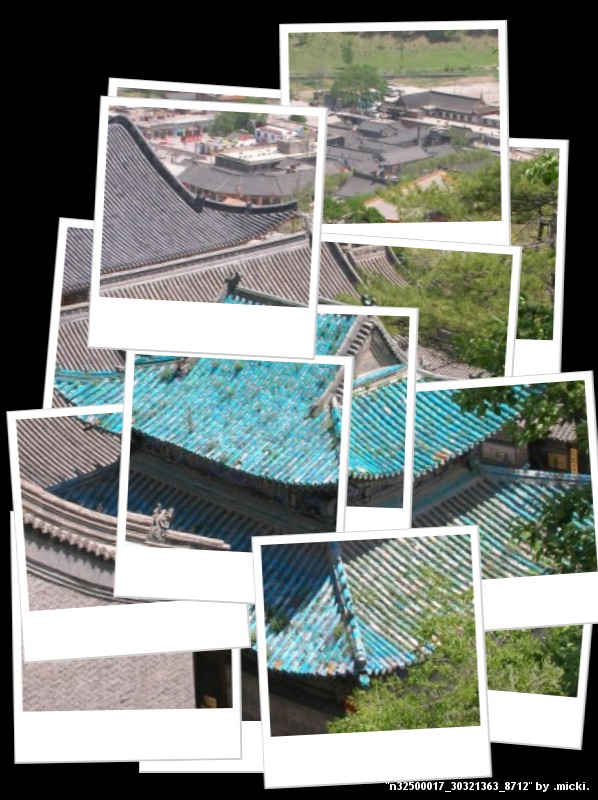 This week seems to be "play week"
Playing with images, library thing, searches, and more
I am now in love with FD's Flickr Toys mostly because it can link directly to my flickr from thier website.
And because they have so many fun toys to play with.
This photo was made with their Hockneyizer tool.
Personally I think David Hockney was a freaking genius so this is right up my alley.
Too bad there's no tool to make your picture into a Japanese woodblock print....something like Hiroshige or Hokusai... then I would be in image generator heaven.
(Jon this would be a great Christmas present) :)
Library Thing -
Although I think Library Thing is a great idea, I don't know that it would be so good for me.
First of all....I have way to many internet things going as it is. I've really taken to Google Reader to read all of my blogs (and I've found like 10 more to read), I've got the whole Ravelry thing going on, Flickr is a bad habbit...and I've got this blog to worry about.
Now that being said.
Library thing is great...it gives you recomendations and keeps track of what you've read. For a voracious reader (unlike myself) I think this would be a great resource. And you can write your own recomendations.
But I have one anyway. Maybe someday I'll really get into it. Just not right now....
Now Rollyo...
I must be a complete idot today...but I have no idea how to use this site.
I've made some search engines..but now what?
How do I use them?
Weird website....
Week #4 - RSS - Feeds
RSS feeds are an interesting thing...it seems like such a good thing...easy to use...puts all the things I love in once place...etc. etc.
but will I actually use it..I guess that is the question.
I have decided to use Google Reader for two different reasons...
First of all because I can link to it directly from my email and I can put a widget on my igoogle homepage.
and
Second of all because I really can't remember anymore passwords or log ins.
So Google Reader it is...
But what do I really think about it?
it SEEMS like such a good idea. I could have all of my knitting blogs, the other blogs I read, my web comics, and news all in one place to check quickly and be done with it.
but will I actually use it..I guess that is the question.
I have decided to use Google Reader for two different reasons...
First of all because I can link to it directly from my email and I can put a widget on my igoogle homepage.
and
Second of all because I really can't remember anymore passwords or log ins.
So Google Reader it is...
But what do I really think about it?
it SEEMS like such a good idea. I could have all of my knitting blogs, the other blogs I read, my web comics, and news all in one place to check quickly and be done with it.
At the very least I will be able to keep up with Very Small Array and Indexed, two blogs I love but never seem to make it into my main reading rotation.
I guess only time will tell if I actually start using Reader...or if I forget about it.
Tuesday, September 16, 2008
Week #3 - Flickr - Technology
So here we go with week 3. Time flies when we are having fun right?
Flickr...I think I've got that puppy down too.
Visit me there. You can see all of my 365 Project Pictures all together in one set without having to read the crap that I say about them.
The thing I most love about Flickr though is that I can organize my pictures. When they just sit on my computer unorganized I feel so bad about it. I can't share them...I can't even find them when they're a big jumble on my computer. With Flickr I can organize them in multiple albums and sets and with tags...oh I just love it. And since I have a paid account I can upload my cute little videos too. Like this one I've been dying to share ever since my post about our trip to Minnesota.
And since all I really want for Christmas is a Flip Mino...the video uploads will really help later! (like when we're in Paris!)
The second most thing I love about Flickr is the Creative Commons search. I just love Creative Commons in general but the search is something fantastic. It puts flickr along side other great reasources for Creative Commons protected material.
GO CC!
I use it for all of my stuff...flickr...this blog...the website I'm writing for class...everything!
Flickr...I think I've got that puppy down too.
Visit me there. You can see all of my 365 Project Pictures all together in one set without having to read the crap that I say about them.
The thing I most love about Flickr though is that I can organize my pictures. When they just sit on my computer unorganized I feel so bad about it. I can't share them...I can't even find them when they're a big jumble on my computer. With Flickr I can organize them in multiple albums and sets and with tags...oh I just love it. And since I have a paid account I can upload my cute little videos too. Like this one I've been dying to share ever since my post about our trip to Minnesota.
And since all I really want for Christmas is a Flip Mino...the video uploads will really help later! (like when we're in Paris!)
The second most thing I love about Flickr is the Creative Commons search. I just love Creative Commons in general but the search is something fantastic. It puts flickr along side other great reasources for Creative Commons protected material.
GO CC!
I use it for all of my stuff...flickr...this blog...the website I'm writing for class...everything!
Week #1 - Library 2.0 - Life Time Learning
Now, I work for the Omaha Public Library and we are doing a program called O! What a Geek. I guess the point is to bring the staff up to speed on new and emerging technologies and to get everyone on the same page in regards to the importance of these kinds of things to reaching and serving out constituency.
So we are exploring Web 2.0 and Library 2.0 technologies.
But what does that really mean? To me the whole "2.0" thing seems like just a buzzword (like information literacy...but thats a whole other argument). I feel like it completely unessesary to be throwing these terms around when most people have no idea what they mean. Do we really need a whole seperate term for these things? And what happens when we move on to the next big thing? Will it be 3.0, 4.0? At some point these things are really going to become indistinguisable from one another. And who said when the 2.0 "revolution" started and 1.0 ended? I guess what I am really asking is are we able to use the term "2.0" in any meaningful sort of way? Or is it simply a buzzword?
Well enough of my soapbox ramblings....down to business.
What I am really here to talk about is the first week of O! What a Geek...Life Time Learning.
After taking a look at the recommended slide show it seems to me that to be a life time learner is not too difficult. It simply takes a open and willing state of mind.
One could learn anything; cooking, knitting, and apparently flying a kite. :)
The point is that the effort is being made to learn something and the 7 1/2 habits of effective learners simply supports one's efforts. Being able to clearly identify one's strengths and weaknesses in their learning abilities is a big part of being an effective learner.
I guess the one point I don't understand is why "Play" is only 1/2 of a habit? :)
ETA: Apparently I have forgotten to state which prize I prefered. I think the gift certificate to Best Buy would be best. More possiblilites this way. Thank you.
So we are exploring Web 2.0 and Library 2.0 technologies.
But what does that really mean? To me the whole "2.0" thing seems like just a buzzword (like information literacy...but thats a whole other argument). I feel like it completely unessesary to be throwing these terms around when most people have no idea what they mean. Do we really need a whole seperate term for these things? And what happens when we move on to the next big thing? Will it be 3.0, 4.0? At some point these things are really going to become indistinguisable from one another. And who said when the 2.0 "revolution" started and 1.0 ended? I guess what I am really asking is are we able to use the term "2.0" in any meaningful sort of way? Or is it simply a buzzword?
Well enough of my soapbox ramblings....down to business.
What I am really here to talk about is the first week of O! What a Geek...Life Time Learning.
After taking a look at the recommended slide show it seems to me that to be a life time learner is not too difficult. It simply takes a open and willing state of mind.
One could learn anything; cooking, knitting, and apparently flying a kite. :)
The point is that the effort is being made to learn something and the 7 1/2 habits of effective learners simply supports one's efforts. Being able to clearly identify one's strengths and weaknesses in their learning abilities is a big part of being an effective learner.
I guess the one point I don't understand is why "Play" is only 1/2 of a habit? :)
ETA: Apparently I have forgotten to state which prize I prefered. I think the gift certificate to Best Buy would be best. More possiblilites this way. Thank you.
Subscribe to:
Posts (Atom)


